How to Use Cruise Control: Buttons, Steps and Safety Tips
The buttons explained, step-by-step instructions for standard and adaptive cruise control, and the situations where you should leave it switched off.
Get up to your cruising speed (usually above 25 to 30 mph), press ON, then SET, and lift your foot off the gas. Use + and − to adjust the speed, tap the brake or CANCEL to pause, press RES to go back to your set speed, and OFF to switch the system off. Use it on open, dry highways, never in heavy traffic, on slippery roads or when you feel tired.
In this guide
Cruise control holds a steady speed so you don’t have to, which makes long highway drives calmer and helps you stay at the limit. The buttons differ a little between brands, but every system works the same way. This guide covers the controls, the exact steps for standard and adaptive cruise control, and the situations where you should leave it off.
The buttons, decoded
You’ll find the controls on the steering wheel or on a stalk behind it. The labels vary, but the functions are the same everywhere.
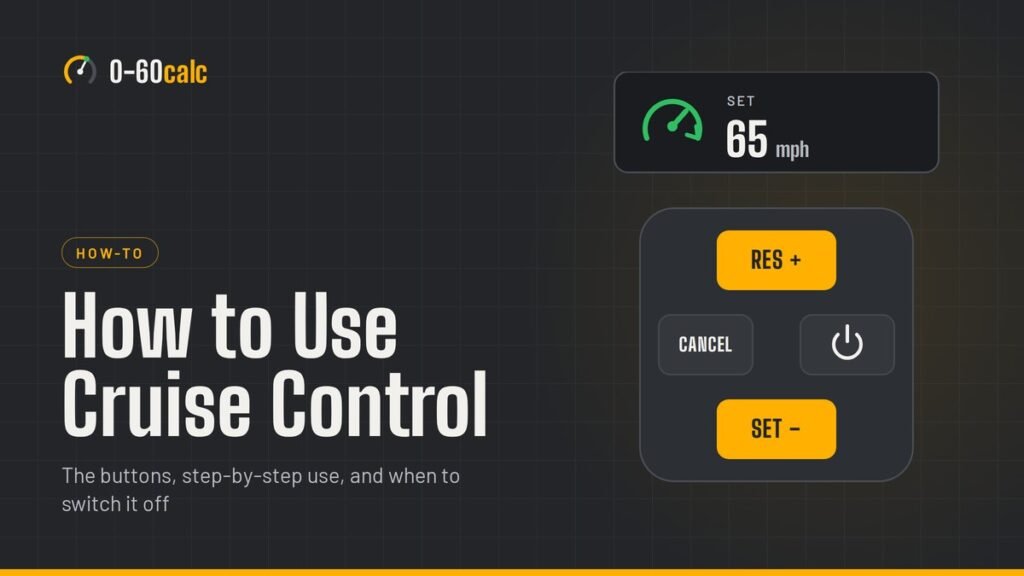
- ON / OFFPuts the system on standby. A light on the dashboard shows it’s ready. Pressing OFF clears the stored speed.
- SET or SET −Locks in your current speed. Once set, each tap lowers the speed a little.
- RES or RES +Resumes your stored speed after you’ve braked or cancelled. Once set, each tap raises the speed.
- CANCELPauses cruise control without forgetting the set speed.
- Brake and clutch pedalsPressing either one cancels cruise control instantly. This is the fastest way to take back control.
- Distance buttonOn adaptive systems only: sets how far behind the car ahead you’ll follow, usually in three or four steps.
- LIMA speed limiter, not cruise control. It stops you exceeding a set speed, but you still press the gas yourself.
How to use cruise control, step by step
- Get to a suitable road. An open highway or motorway where you can hold a steady speed, in dry conditions.
- Switch the system on. Press ON (or the cruise button). A standby light appears on the dashboard.
- Accelerate to your speed. Most systems only work above a minimum, typically around 25 to 30 mph.
- Press SET. The indicator usually turns green. Gently lift your foot off the gas; the car holds the speed.
- Adjust as you go. Tap + or − to change the speed in small steps, or hold the button for bigger changes.
- Pause when you need to. Tap the brake or press CANCEL. The set speed stays in memory.
- Resume or switch off. Press RES to return to your set speed when the road is clear, or OFF when you’re done.
Pressing the gas while cruise is on lets you speed up temporarily, to overtake, for example. When you lift off, the car settles back to the set speed.
How to use adaptive cruise control
Adaptive cruise control (ACC) adds a radar or camera that watches the car ahead. You set a maximum speed and a following distance; the system slows down when traffic slows and speeds back up when the lane clears.
- Switch the system on and make sure adaptive mode is selected. Some cars let you choose between adaptive and normal cruise in the settings menu.
- Drive at the speed you want and press SET.
- Use the distance button to choose a following gap. Longer gaps give you more time to react, and are the better choice in poor visibility.
- Watch the indicator. On many cars, a car icon or a color change shows when the system has locked onto a vehicle ahead.
- In stop-and-go traffic, systems with that feature can bring the car to a stop. After a longer stop you may need to press RES or tap the gas to move off again.
Planning a long drive?
Work out your trip time and true average speed, including slower stretches.
Open the Speed CalculatorWhen not to use cruise control
Heavy traffic
Constant speed changes mean you’d be cancelling and resuming every few seconds, and standard cruise won’t react to the car ahead.
Rain, snow and ice
On slippery roads you need full control of the throttle. Cruise control can keep driving the wheels when the tires start to lose grip.
Winding roads and steep descents
A constant speed is often unsafe through bends, and going downhill the car can run faster than you’d choose.
When you’re tired
With your feet off the pedals, it’s easier to drift into drowsiness. If you’re tired, stop and rest instead.
Other times to switch it off: construction zones, busy towns and whenever you’d want to react faster than a button press allows.
What adaptive cruise control can’t do
Car makers are clear that ACC is a driving aid, not a collision-avoidance system. Volvo’s owner’s manuals list typical limitations that apply to most systems:
- The radar has a limited field of view, so a car cutting in close may be detected late.
- Motorcycles and vehicles driving off-center in the lane may not be detected.
- In curves, the system can lock onto the wrong vehicle or lose the one ahead.
- Many systems don’t react to pedestrians, animals, bicycles or stationary objects.
- Snow, ice or dirt over the sensor can switch the system off.
You remain responsible for braking and for keeping a safe distance. Keep your hands on the wheel and your foot ready.
Cruise control vs speed limiter
A speed limiter sets a ceiling: you drive normally, but the car won’t go faster than the limit you choose unless you push through a kickdown or switch it off. It’s useful in towns and in average-speed camera zones. Cruise control does the opposite job, holding a steady speed without your foot on the gas. Many cars offer both on the same buttons, so check which mode the dashboard shows.
Does cruise control save fuel?
On flat, open highways it usually helps, because a steady throttle avoids small, wasteful speed changes. On hilly roads it can use more, since it holds speed uphill harder than most drivers would. The biggest saving comes from the speed you choose: setting it a few mph lower cuts fuel use more than cruise control ever will.
If cruise control won’t engage
- Check you’re above the minimum speed; many systems cancel below about 25 mph.
- Make sure the system is switched on and the standby light is showing.
- Look for warning lights: traction or stability control faults often disable cruise.
- For adaptive systems, clean the sensor area on the grille or windshield.
- If the brake lights aren’t working, the brake light switch may be at fault; cruise control relies on it and a garage should check it.
A quick history
Modern cruise control was invented in 1948 by Ralph Teetor, an American engineer who was blind. It first reached mass-produced cars in the late 1950s, and today adaptive systems that can follow traffic to a stop are common on new cars.
Key takeaways
- Reach your speed, press ON, then SET, and lift off the gas.
- The brake, clutch or CANCEL pauses cruise; RES brings back the set speed.
- Standard cruise usually works only above about 25 to 30 mph.
- Skip it in heavy traffic, on slippery or winding roads and when tired.
- Adaptive cruise still needs your full attention and your foot ready to brake.
FAQ
What speed can you use cruise control at?
Standard cruise control usually engages above about 25 to 30 mph. Many adaptive systems can keep following traffic at lower speeds and some can bring the car to a stop. Check your owner’s manual for your car’s range.
How do I turn off cruise control?
Tap the brake or press CANCEL to pause it while keeping the set speed in memory. Press OFF, or switch off the ignition, to turn it off completely and clear the stored speed.
Can you use cruise control in the rain?
It’s best not to. On wet or slippery roads you need full control of the throttle, and cruise control can keep powering the wheels when the tires begin to lose grip.
Can I use cruise control in a manual car?
Yes. It works the same way, and pressing the clutch pedal cancels it. You’ll need to press RES after changing gear to pick up your set speed again.
Is it bad to use cruise control in the city?
Standard cruise control isn’t designed for stop-start traffic and most systems won’t engage at low speeds. Adaptive systems with stop-and-go can help in queues, but in busy towns with pedestrians and junctions it’s safer to drive yourself.
Sources
- RAC: how to use cruise control and when to avoid it
- Ford: using standard and adaptive cruise control
- Volvo: adaptive cruise control limitations
Related guides
What Is a Dyno? Dyno Testing, Tuning Costs & How to Read a Dyno Sheet
A dyno measures an engine's torque and rpm under load and calculates horsepower. Engine vs chassis…

What Is G-Force? Meaning, Examples in Cars & F1, and How Many G’s Humans Can Take
G-force is acceleration measured against gravity: 1 g is 9.80665 m/s². How to work it out,…
What Is Horsepower? Meaning, Formula & What It Means for Your Car
Horsepower is how fast an engine does work: 33,000 foot-pounds per minute, or 745.7 watts. The…